
Biolink Server

Choose where your data lives

Every Biolink record lives on its own private server. Pick the option that fits you: a computer you already have, a turnkey Biolink Server that’s ready to plug in, or Biolink Cloud, run for you.

Founders Club

Limited-time offer for early beta testers

Founders Club members get the exclusive offers below. Enter your code here, then choose your Biolink product.

  • Self-Hosted license: 6 months free, then $59 a year. You skip the $149 first year.
  • Turnkey Biolink Server: $425 plus tax and shipping, instead of $499 plus tax.

{{ foundersNote }}

Self-Hosted Coming soon Available

Biolink software license

Run Biolink on your own hardware. One license covers any installation option below, and runs a single Biolink Server at once.

License
$149 first year
Renewal
$59 per year. Cancel any time.
Installation options
Windows 11 PCBeta

A Windows installer runs Biolink inside an isolated Docker container. Don’t sweat: the installer handles all of the setup for you.

Ubuntu Linux (Biolink OS)AvailableComing soon

Installs Biolink OS, built on Ubuntu Linux. Note: Biolink OS is a full operating system installation and erases the computer’s whole disk.

Raspberry Pi 5 (Biolink OS)Coming soon

Installs Biolink OS, built on 64-bit Raspberry Pi OS, on a Raspberry Pi 5. Note: Biolink OS is a full operating system installation and erases the whole disk. A small, quiet server that can sit on a shelf.

Updates, access from your phone when you’re away from home, and email support for installing on supported hardware, while your license is active.

Checking availability…

{{ licenceNote }}

The Biolink Server image erases the whole disk of the machine you install it on.

{{ buyHint }}

Join the waitlist{{ licenceSoonText }}

Already have a license? Renew it from My license.
Dedicated Mini-PC Waitlist Reservations open

Turnkey Biolink Server

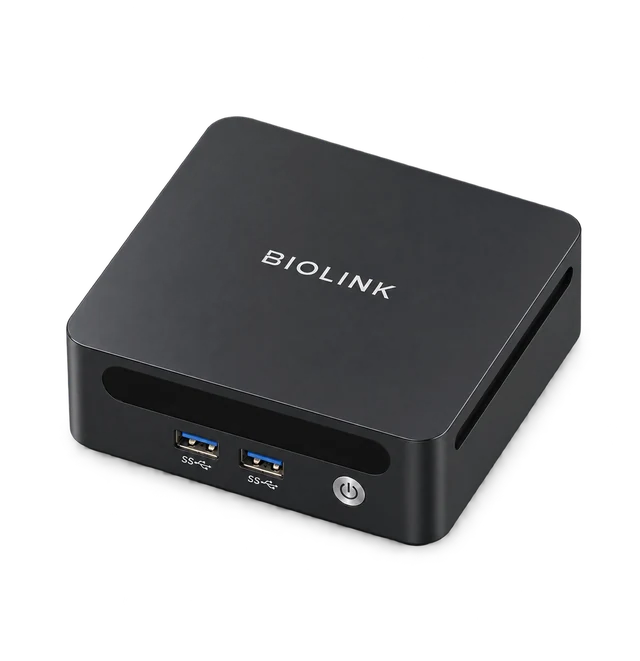
A computer that arrives with Biolink installed and set up to store your wellness data. Plug it in and pair your phone. Pre-order, United States only.

The turnkey Biolink Server: a small black computer with BIOLINK on its lid
Deposit
$100 refundable
Final price
$499 plus tax, with your $100 deposit credited toward it
License
First year included, then $59 per year
Arrives with Biolink installed, so there’s no setup on your own computer.
A dedicated computer whose only job is running Biolink and storing your record.
When your batch is ready, we email a dated quote for the balance. Cancel any time before you pay it, and we refund your deposit.
The first year of your license starts when you set it up. Set it up within 60 days of shipping.

Thank you: your turnkey Biolink Server is reserved. We’ve emailed you your place in line. You can see or cancel it on My license.

Shipping to the United States only. No tax on the deposit; the final price and its tax come in your quote.

{{ reserveHint }}

Join the waitlistReservations aren’t open yet.
Cloud Coming soon

Biolink Cloud

Your own private Biolink Server, run for you in the cloud. Nothing to install and no computer to keep running: a server set aside for your household alone.

Price
Monthly subscription, based on usage. Contact us for pricing.
Includes
Hosting, updates and support
A dedicated virtual machine on Google Cloud, for your household alone, with its own storage and its own encryption key. Your record never shares a database with anyone else’s.
Encrypted all the way to your server, which has its own web address and its own security certificate.
Always on, and your phone reaches it from anywhere. No home network or router setup.
Biolink runs the server, so we can start and update it. Staff have no routine access to your data; anything else is an audited emergency procedure.
Only your recovery code can reset your password. Biolink has no reset tool.
Backups go to your own Google Drive or OneDrive, so you can move to a Biolink Server of your own later.
Join the waitlistBiolink Cloud isn’t open yet.

How it works

Three steps to a working server

  1. 01

    Set up your server

    Power on your turnkey Biolink Server, or install Biolink on your own hardware. A setup wizard guides you through a simple onboarding and shows a QR code to pair your phone.

  2. 02

    Pair the mobile app

    Open the Biolink app on your iOS or Android device and scan the QR code shown on your server.

  3. 03

    Connect your data

    Allow Apple Health access, connect Oura, WHOOP or other wearables, and add lab results, medications and supplements.

If your license ends: Your server keeps running.

  • Your records, exports and backups stay on your hardware for as long as you want.
  • You can still install the last version released while your license was active. To move to new hardware, contact us.
  • If your license expires, you stop receiving new versions and ongoing support. Renewing brings them back.
  • A yearly license keeps working for 14 days after its renewal date.

Payments are handled by Stripe. Tax is added at checkout where it applies. The billing service never receives your health records.

Questions

Before you buy

Can I switch between Windows 11, Ubuntu Linux and Raspberry Pi?

Yes, once the Biolink Server image and Raspberry Pi 5 support are out. Your license code works with any of them, and one license runs one Biolink Server at a time. To switch, move your license to the new computer from My license (you can do this twice a year; after that, contact us), then restore a backup there.

How is Biolink Cloud different from running your own server?

It’s the same Biolink software and the same apps. When you run your own server, the hardware is yours. With Biolink Cloud, we run a virtual machine on Google Cloud set aside for your household alone, with its own disk and its own encryption key. No other customer’s data is on it, and it runs the same signed Biolink release as a server you run yourself. Connections are encrypted all the way to it. We can start and update it, and Google hosts the hardware. Staff have no routine access to your data, and we can’t reset your password: only your recovery code can.

Do I need the mobile app?

The mobile app (in beta) brings in your Apple Health data on iPhone and puts Biolink on your phone. Without it, you can use the web app in a browser, and Oura connects directly either way. The Android app is coming soon; until then, use the web app.

Is the turnkey server deposit refundable?

Yes. Cancel any time before you pay the balance and we refund your $100 deposit. If you go ahead, the deposit is credited toward the final price.

When does the turnkey server's license start?

The first year is included and starts when you set the server up. Set it up within 60 days of shipping; if you need more time, ask us before then. After that date its code stops working, so contact us and we'll help.

Does the store see my health records?

No. The store keeps your email address, country and orders, and Stripe handles payments. The store never receives your health records.

Is tax included?

Tax is added at checkout where it applies. There's no tax on the turnkey server deposit; the final price and its tax come in your quote.

Learn more.

See exactly how your Biolink Server works and what leaves it, or ask the Biolink team.